Fuel management for twins: feeds and crossfeed.
Fly a Twin Comanche, Seneca, Seminole, or Baron? SkyTimer draws each engine’s feed, estimates every tank, and reminds you of the next step in your fuel plan for both engines at once.


Each engine, its own feed
In most light twins, each engine has its own fuel selector and normally feeds from tanks on its own side. Crossfeed lets an engine draw from the other side, for example to balance fuel or with one engine shut down, following the POH. With mains and aux tanks on each side, that’s a lot of positions to keep straight.
-

Both feed paths, drawn
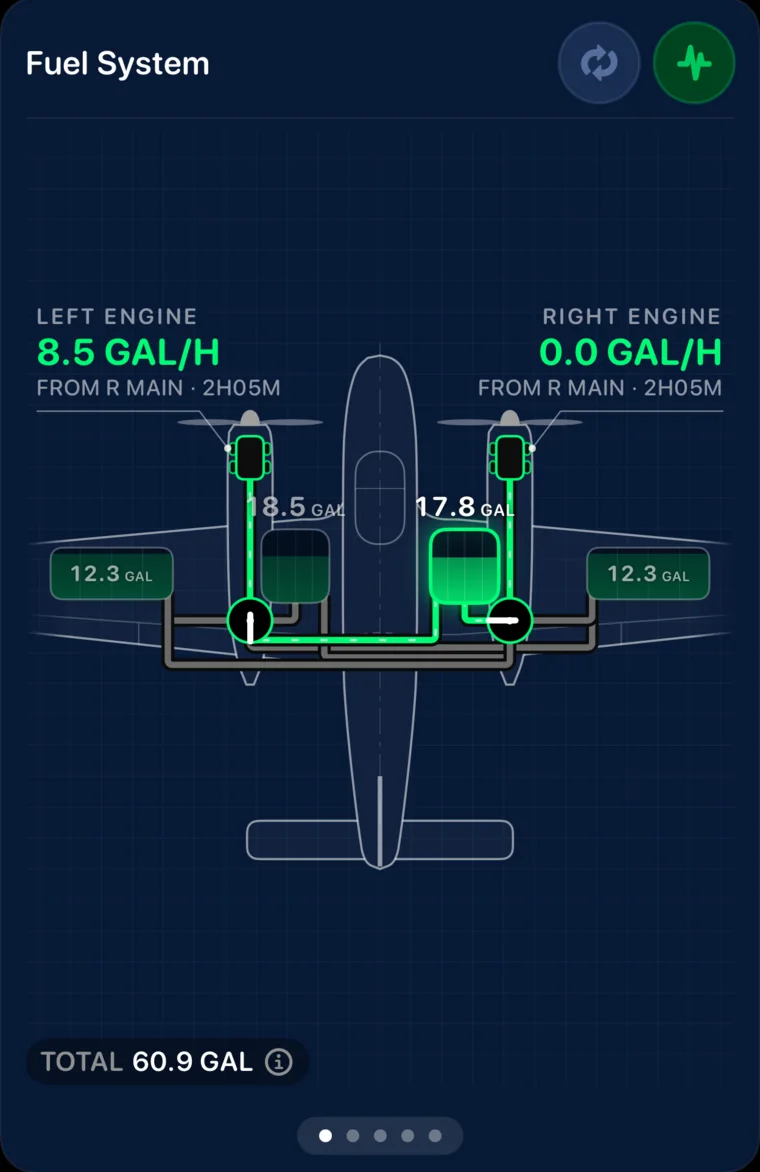
Each engine’s selected tank and path, with estimated fuel in every main and aux tank.
-
Crossfeed
With the right engine shut down, the left engine draws from the right main. SkyTimer keeps estimating every tank.

One reminder, both engines
When a step changes both selectors, the reminder lists an action for each engine, such as left aux to left main and right aux to right main. Do them one at a time, or tap Complete All Actions.
- Switch to Auxes, Switch to Mains. Time or fuel-level reminders for each stage of your fuel plan.
- Transfer pumps. Reminders to start and stop nacelle transfers.
- Imbalance alert. A warning when the sides are estimated to be too far apart.
SkyTimer estimates fuel from your starting fuel, fuel flow, time, and the fuel system you configure. It doesn’t measure fuel. Use it alongside your fuel gauges and your POH, never instead of them.
Twins that start with typical values
Every value is marked TYPICAL until you check it against your POH. Most twins start with one tank per side; add aux tanks in the aircraft builder if yours has them.
- Aero Commander 500 / Shrike (Twin Commander)
- Beechcraft Baron 58
- Diamond DA42 Twin Star
- Piper PA-30 Twin Comanche (Mains and aux, crossfeed)
- Piper PA-30 Twin Comanche (Nacelle tanks with transfer pumps)
- Piper PA-34 Seneca
- Piper PA-44 Seminole
Questions about twins
Something else? Visit Support.
Can I set fuel flow for each engine?
Yes. Fuel flow is set per engine, in gallons, liters, pounds, or kilograms per hour, with separate taxi, takeoff, and cruise flows. Change either engine’s flow at any time, including by tapping it in the drawing.
Does SkyTimer tell me when to crossfeed?
No. Crossfeed procedures come from your POH. SkyTimer shows crossfeed in the drawing when you select it, keeps estimating each tank, and can warn you about a fuel imbalance. Set reminders for the steps in your own procedure.
My twin has aux or nacelle tanks. Is that supported?
Yes. The Twin Comanche types include mains and aux tanks, with or without nacelle tanks and transfer pumps. Other twins start with one tank per side; add aux tanks in the aircraft builder, up to 7 tanks in all.
Does SkyTimer support aircraft with more than two engines?
No. New aircraft can be single-engine, twin, or centerline twin.
More fuel system guides
Try it with your aircraft.
Download SkyTimer, choose your aircraft type, and check the typical values against your POH.